-
Jun 15, 2024
I started my side project - Wizafin - last week.
The first part is the Authentication. I’ve looked into many plug-and-play solutions such as Supabase, Auth.js and Clerk. They seems very interesting, I was tempting to put one of them into the project for a fast iteration. But as my curiosity got a better of me, I’ve decided to roll my own authentication with the help of Lucia and Drizzle ORM.
This is the first and simple version of database in order to do the work.
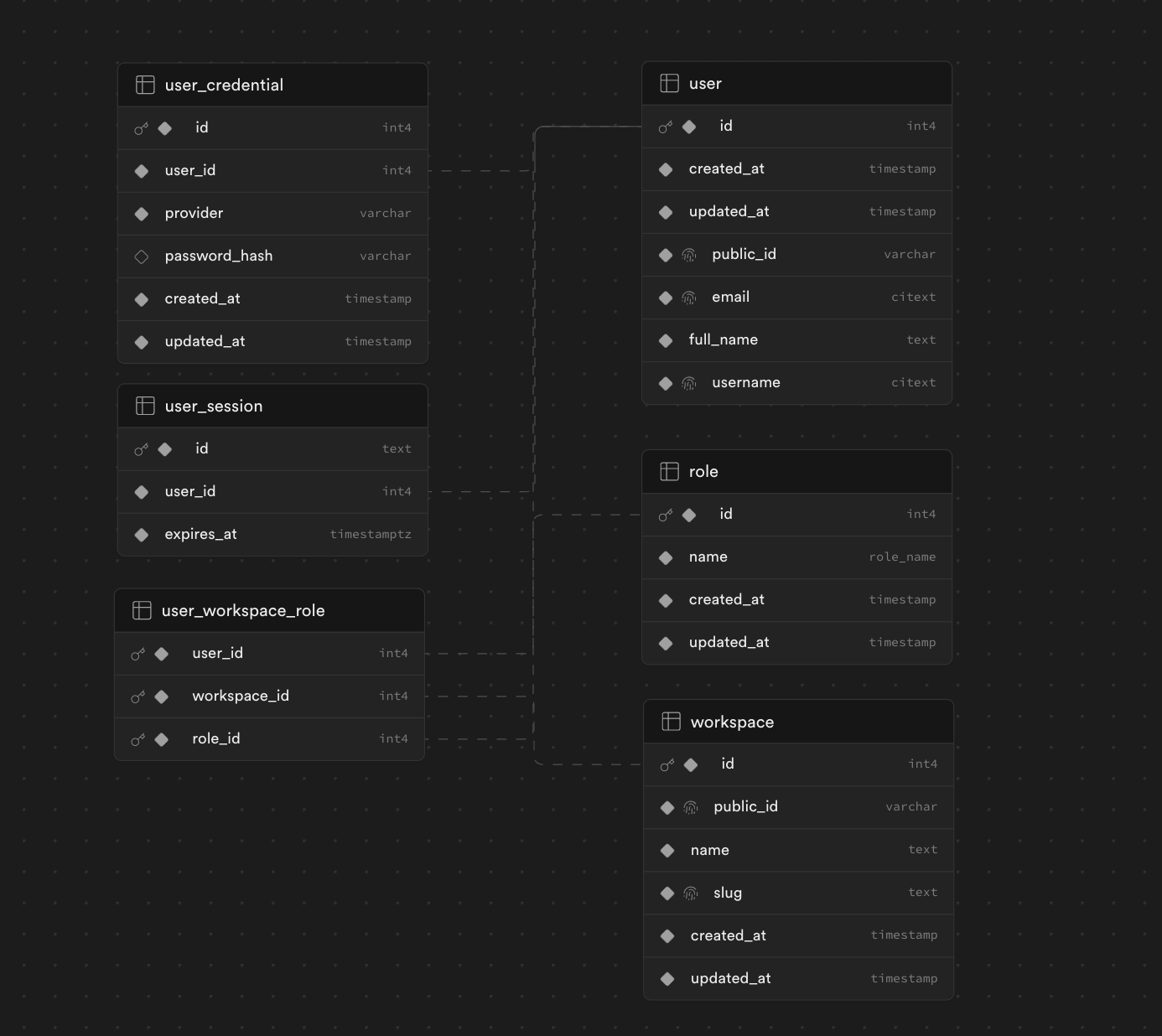
-
Jun 6, 2024
I discussed my Docker issue with a friend, who provided valuable insight into the problem.
During the build process, I mounted an empty directory from the host to the container to persist my database content. This action inadvertently caused the SQLite file generated by pnpm db:migrate to be deleted.
The reason I observe an SQLite file in the host directory without any predefined schema is that it was created by the application running inside Docker. Since the designated directory for the SQLite file is empty, the application automatically generates a new SQLite file.
The mystery is now resolved.
-
Jun 4, 2024
This is outrageous! During the build process, I attempted to bind mount a directory and write to it from a Docker host to a container. However, the content did not appear as expected.
Here is an example:
Dockerfile FROM base AS buildWORKDIR /appRUN --mount=type=cache,id=pnpm,target=/pnpm/store pnpm fetch --frozen-lockfileRUN --mount=type=cache,id=pnpm,target=/pnpm/store pnpm install --frozen-lockfileCOPY . .RUN pnpm buildRUN pnpm db:migrate # this will create ./data/db.sqlite file in root directory.The command
pnpm db:migratewrites a series of SQL commands into a local SQLite file to create predefined schemas.I attempted to mount that SQLite file into a Docker host directory to persist the data, creating a volume in my docker-compose.yml to accomplish this.
docker-compose.yml services:service_name:build: .restart: alwaysnetworks:- traefik_networkvolumes:- ./data:/app/dataUnexpectedly, in the host directory, the ./data/db.sqlite file appeared without any schemas created.
Using named volumes seems to resolve the issue.
docker-compose.yml services:service_name:build: .restart: alwaysnetworks:- traefik_networkvolumes:- ./data:/app/data- my-data:/app/datavolumes:my-data:As a result, I am considering switching to Supabase or another remote database service. It appears this was a skill issue on my part.
-
Jun 3, 2024
After a few days of experimenting with various options, I have settled on the following stack for my upcoming side project:
- SvelteKit
- SQLite for a self-managed database (I considered using a remote database service such as Supabase or Neon)
- Drizzle ORM
- Lucia for authentication
- Tailwindcss
- I might use Bun for running the whole project since it makes Typescript easier to setup
I plan to deploy this application on my private VPS, which will be accessed via Cloudflare proxies.
-
Jun 2, 2024
I’m exploring database ORMs for the first time, implementing Drizzle into my demo Svelte app. I’m enjoying the experience thus far—the type safety, schema definitions, and migrations. What’s great about Drizzle is that it doesn’t require me to learn a new language to work with it.
Lovely!
-
May 31, 2024
I came across this article while learning SvelteKit for a side project.
Everything seemed fine, but then I noticed this piece of code:
// ...import { addCustomerToDb } from '$lib/db.ts';export async function POST(event) {const { name, income } = await event.request.json();const addedCustomer = await addCustomerToDb(name, income);return json(addedCustomer);}While seemingly ordinary, my curiosity got the better of me, and I couldn’t move on from the article. I decided to implement a simplified version
$lib/dbwithsqlite3, which was quick to setup. Now, I’m exploring similar implementations with other technologies, such as:I often find myself getting distracted by engineering endeavors like this… but I just can’t resist.
Is this tendency a good or bad thing? I don’t know.
Now, I’m finding myself reading about why we should use NanoIDs instead of UUID - Why we chose NanoIDs for PlanetScale’s API.